![xcelerate-black-color-1.png]](https://www.xlrestorationsoftware.com/hs-fs/hubfs/xcelerate-black-color-1.png?height=40&name=xcelerate-black-color-1.png)
What is a chargeback?
A chargeback occurs when money that was collected from a customer's account is reversed and is charged back to your merchant account. This can be due to a disputed transaction initiated by the customer or an ACH return.
What causes an ACH chargeback?
Because the ACH network is unable to provide real-time authorizations, an authorized payment can be reversed due to insufficient funds, incorrect account information, closed account, etc. Such chargebacks usually happen 3-5 days after the original date of the transaction and are typically called ACH returns. Additionally, account holders can dispute ACH payments up to two years after the settlement date.
ACH chargebacks are not defendable as they work similarly to a bounced check.
What happens when an ACH chargeback occurs?
- The email addresses added to the merchant portal notifications will receive an email notification stating there is a chargeback to your merchant account.
-
The chargeback amount is debited from your Xcelerate Pay merchant account and you will see that reflected in your next payout.
- A chargeback fee of $15 is also deducted from the payout.
What do I need to do for an ACH Chargeback?
- View the chargeback in the merchant portal by logging in a https://payments.xlrestorationsoftware.com/
- Navigate to Transactions -> Disputes and open the related transaction.
- View the Reason Message under the Dispute Details. This data point will tell you the reason for the chargeback and determine if payment needs to be recollected due to the return or if the customer disputed the transaction. You can use this reference table to for description and resolution details.
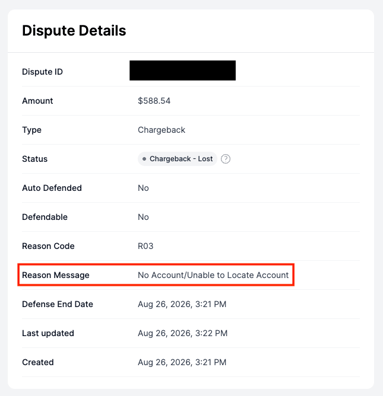
- Scroll down further on the page to Payment Details to determine the customer/invoice the payment is associated with.
ACH Chargeback Example
In this example, the account is on a T+2 (transaction date plus two business days) funding delay and has taken a $1000 ACH payment with a 1% processing fee. A “R03 - No Account/Unable to locate account” chargeback occurred 3 business days after the initial day of payment. The table below will show the payment flow of the funds in question for reconciliation and account purposes.
|
Date |
Action |
Net Transaction Amount |
|
May 26th |
$1000 ACH payment taken |
$990 |
|
May 27th |
Funds are in transit |
|
|
May 28th |
Deposit Date |
+$990 |
|
May 29th |
R03 – “No Account/Unable to locate account” Chargeback Notification via Email & $15 Chargeback Fee applied on Merchant |
-$990 Deducted |
Important ACH Chargeback Related Information
- Adyen refers to ACH returns as chargebacks. It is not possible to defend ACH returns.
- Both Chargebacks and Refunds are debited from your Floorzap Payments merchant account, not directly from your bank account.
- If you have not been paid out a customer’s ACH payment yet you receive a chargeback notification within 5 business days of the payment date, please keep this in mind:
- ACH payments can take up to 5 business days to fully clear from the customer’s bank, which means collection of funds can take place after deposit date listed in your merchant portal if you are on Two Day Funding.
- This is not an indefinite process and will be resolved to update automatically in the coming months.
- The merchant portal should always be your first step in the chargeback management process for the following reasons:
- In order to review chargeback reason
- Verify if its defendable or automatically lost
- Clarify the specific transaction that is being disputed in order to contact the customer
- For further details and explanation of the ACH chargeback, please refer to the ACH Chargeback Reference Table.