![xcelerate-black-color-1.png]](https://www.xlrestorationsoftware.com/hs-fs/hubfs/xcelerate-black-color-1.png?height=40&name=xcelerate-black-color-1.png)
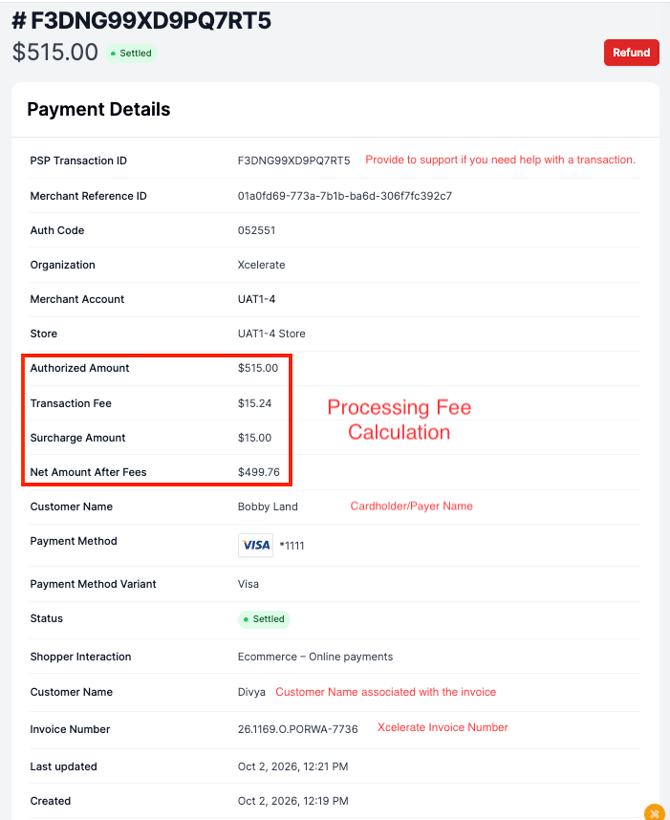
Xcelerate Pay deducts processing fees from the transaction before it is batched out and sent to the bank account on file. Since all fees are deducted at time of transaction, you receive the net amount of the transaction.
Example (without surcharging)
| Authorized Amount | $1,500.00 |
| Processing Fee (2.9% + $.30)* | $43.80 |
| Net Transaction Amount | $1,456.20 |
*fee calculation: ($1,500 x 0.029) + $0.30 = $43.80
Example (with surcharging)
| Invoice Total | $1,500.00 |
| Surcharge (3%) | $45.00 |
| Authorized Amount | $1,545.00 |
| Processing Fee (2.9% + $.30)* | $45.11 |
| Net Transaction Amount | $1,599.89 |
*fee calculation: ($1,545 x 0.029) + $0.30 = $45.11
Viewing Processing Fees on a Transaction
Login to the merchant portal at payments.xlrestorationsoftware.com Navigate to Transactions -> Payments -> select the payment you want to view.
How can I view multiple transactions at once?
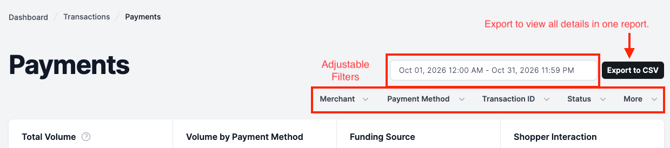
If you want to view transaction details for multiple transactions, you can adjust filters and export a report from the Payments page.
If you want to reconcile transactions within a batch, check out this article to learn how to view transactions within a payout.